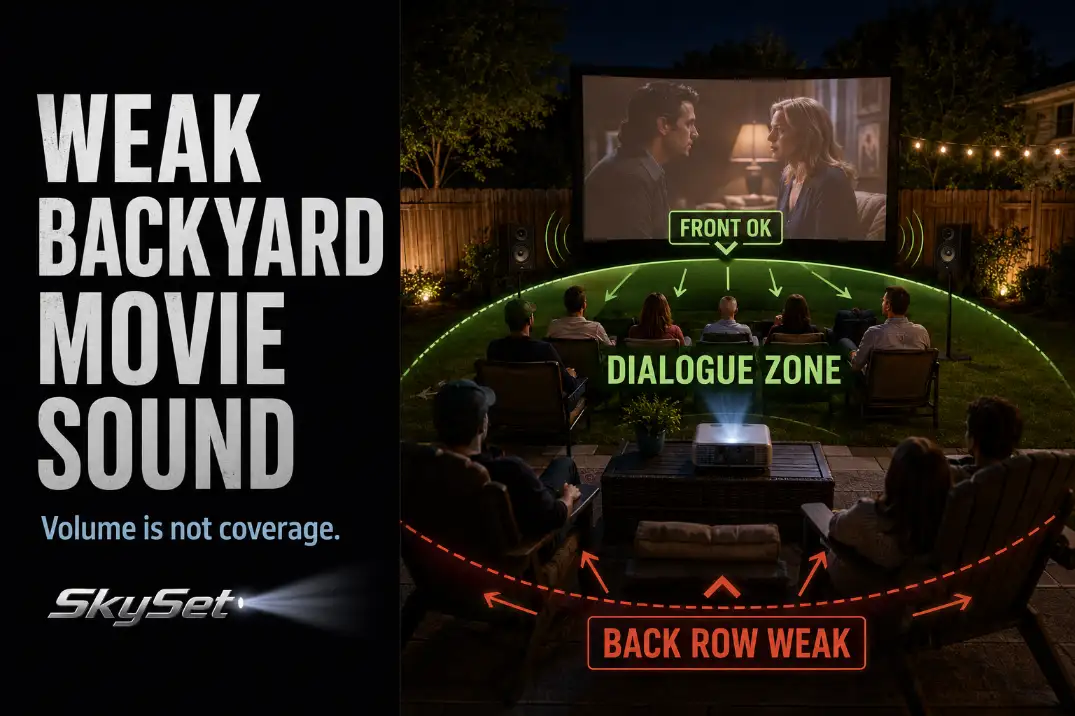
Backyard movie sound usually feels weak outdoors because the speaker is trying to fill open space instead of a defined listening area.
In a living room, walls, ceilings, and furniture help hold sound around the listener. In a backyard, the same sound spreads away from the screen, past the seating, and into the rest of the yard.
The fastest test is simple: play a normal dialogue scene for 60 seconds, listen from the closest chair, then stand in the back row about 12–18 feet from the screen.
If the front row sounds loud but the back row misses words, the main problem is coverage, not raw volume.
That is different from a picture problem: a washed-out image may improve as the yard gets darker or screen-facing light is controlled, as explained in Outdoor Projector Washed Out, but weak outdoor sound needs better speaker placement, listening distance, and noise control.
Turning a small speaker past about 70–75% often makes the closest seats harsh while the farthest seats still lose dialogue. Before buying a louder speaker, check whether the sound is actually reaching the people who need to hear it.
Open-Air Sound Loss
Diagnose coverage before speaker power
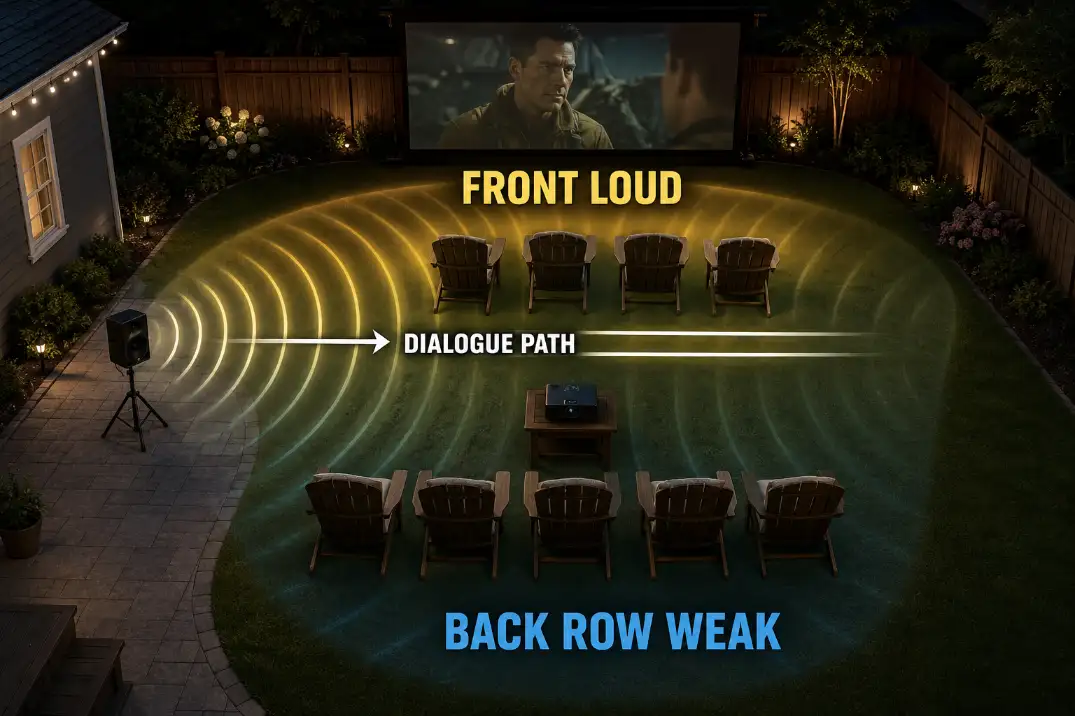
If the front row is loud but the back row cannot follow normal dialogue, diagnose the sound path before blaming the speaker. Outdoors, sound has fewer surfaces to bounce from, so it does not wrap around the audience the way it does inside a room.
The symptom is usually weak dialogue, not total silence. Music may still feel big. Action scenes may still sound exciting.
But quiet speech, consonants, and lower-volume scenes lose definition first. That is why people often say, “I can hear it, but I can’t understand it.”
Use dialogue, not trailers
Trailers and action scenes hide weak coverage because they are mixed to sound loud and dramatic. A normal conversation scene exposes the real problem.
Listen from three places: the closest chair, the farthest chair, and one side seat. If only one part of the seating area sounds clear, the speaker is not covering the audience evenly.
This matters because outdoor movie problems often overlap. The same setup choices that create weak audio can also create glare, cord conflicts, poor seating depth, and screen placement issues, which is why Backyard Movie Setup Mistakes should be checked as a whole-layout problem, not only as an image problem.
Built-In Speaker Limits
Use projector audio only for very close seating
Built-in projector speakers are usually the weakest part of an outdoor movie setup. Many are designed for short-range indoor listening, where nearby walls help the sound feel fuller.
Outside, a small built-in speaker has to compete with open air, distance, patio noise, wind, and people talking.
The location is also wrong in many setups. If the projector sits behind the audience, the sound comes from behind the viewers while the movie is on the screen.
If the projector sits near the screen, the sound source may be too far from the back row. Either way, the speaker position is chosen by image throw, not by where people need to hear dialogue.
For a very small setup with 2–3 people sitting close together, built-in sound may be acceptable. Once seats spread beyond one compact row, it usually stops being a serious outdoor sound solution.
When weak sound is really a connection problem
Not every audio complaint is a speaker-power problem. If the sound arrives late, the issue may be Bluetooth lag. If the sound is thin or distorted, the source volume, projector output setting, adapter, or speaker pairing may be limiting the signal before it reaches the speaker.
Check the chain in this order: source device volume, projector or streaming stick audio output, Bluetooth or cable connection, then speaker volume.
If the speaker sounds better when connected directly to a phone than through the projector, the weak point is probably the connection path.
Setup Note: Do not move the projector just to improve sound if the image throw is already correct. Keep the projector where the picture works, then solve audio with speakers placed for the audience.
Seating Distance
Distance changes speech clarity faster than people expect
For a small family movie night with 2–4 people sitting within about 6–8 feet of a speaker, one compact speaker can work in a quiet yard.
Once the farthest seat reaches 12–18 feet, the same speaker may still be loud enough to hear but not clear enough for dialogue.
Around 20 feet or more, one small speaker often stops making sense unless the yard is unusually quiet and the speaker is aimed well.
The practical threshold is not whether you hear sound. It is whether people can follow normal conversation in the movie without leaning forward, turning on subtitles, or asking someone to raise the volume again.
Widen the sound area when you widen the seating
Many backyard setups fail because the seating area grows wider while the sound source stays the same. A speaker that works for one row may not cover a semicircle of chairs, side seats, and kids sitting on blankets. The result is uneven: one person says it is too loud, another says they cannot hear.
Plan the seating and sound together. If you are already arranging screen distance, projector throw, walking paths, and cord routes, include speaker placement in that same layout decision.
A clean starting plan, like the one in Backyard Movie Night Setup, prevents audio from becoming an afterthought.
Wind Direction
Treat wind as a modifier, not the first diagnosis
Wind can make outdoor sound feel unstable, but it should not be the first thing blamed. A poorly placed speaker, excessive seating distance, or projector-only audio is usually more important. Wind becomes more relevant after the basic listening area is already reasonable.
A 5–10 mph breeze can expose a borderline setup, especially in open yards, corner lots, coastal California patios, or backyards without fences or nearby structures.
The sound may seem fine for a few minutes and then feel thinner on one side of the seating area. That does not always mean the speaker changed. The listening conditions changed.
Test from the downwind side
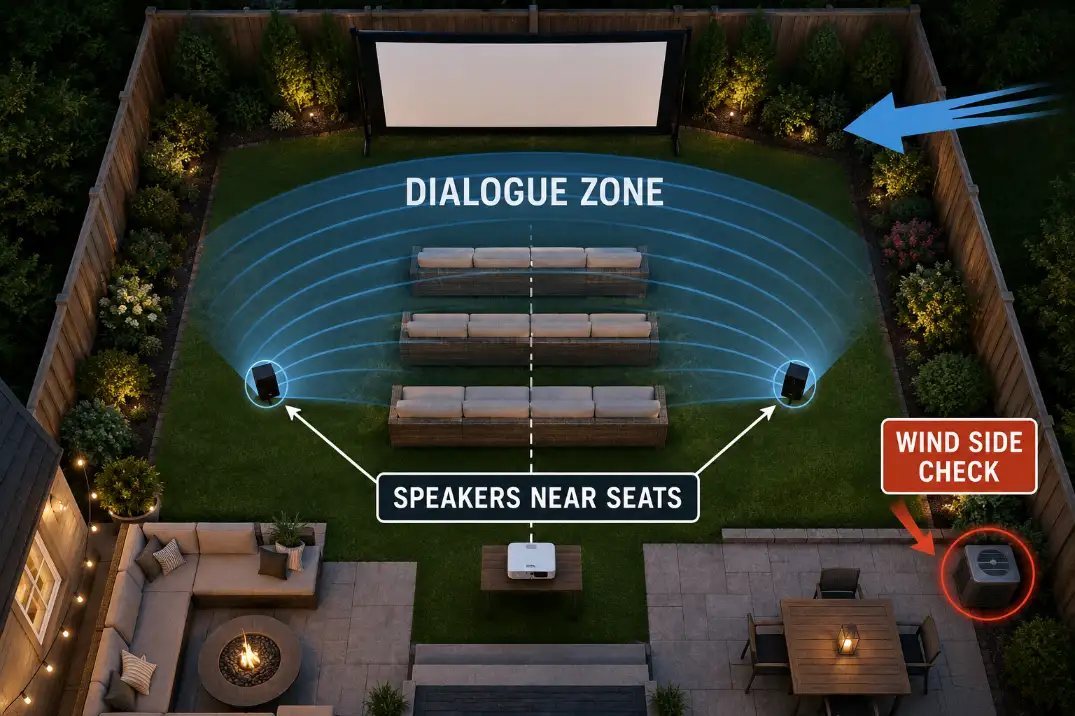
The useful test is not standing beside the speaker. Stand where the weakest listener sits, especially on the downwind side of the seating area. Play a dialogue scene for 2–3 minutes and listen for words fading in and out.
If one side of the seating area keeps losing speech while the middle stays clear, widen or redirect the speaker coverage.
Do not solve a wind-side problem by blasting the whole yard louder. That usually makes the closest seats uncomfortable and sends more sound toward neighbors.
Background Noise
Masking is the problem people underestimate
Background noise does not need to be extreme to damage dialogue. A pool pump, AC condenser, road noise, neighbor activity, wind in trees, or a snack area behind the seats can cover the quiet parts of speech. The movie is still playing, but the words lose definition.
This is common in warm-weather yards where equipment runs during evening use. In humid Southern yards, from Florida to parts of Texas, AC condensers and pool equipment may still be running during backyard movie time.
In Midwest suburbs, insects, road noise, and nearby patios can become more noticeable after sunset. The important point is not the region itself. It is whether the background noise sits between the speaker and the listener.
Use a normal-conversation check
If two people standing 3–6 feet apart need to raise their voices before the movie even starts, the listening environment is already competing with dialogue.
That does not mean the movie cannot work. It means speaker placement must be tighter and more intentional.
More bass will not fix this. More volume may not fix it either. Bass can make the movie feel bigger while speech still stays unclear.
The better move is to place speakers closer to the seating area, aim them through the rows, and keep noisy equipment out of the main dialogue path when possible.
| What You Notice | Most Likely Meaning | Better Move |
|---|---|---|
| Front row says it is loud, back row misses words | Coverage gap | Move or add speakers closer to the seating area |
| Dialogue fades when AC, fans, or pumps run | Background noise is masking speech | Shift seats or speakers away from the noise path |
| One side hears better than the other | Narrow or misdirected speaker aim | Aim speakers across the full chair group |
| Music sounds fine but talking scenes feel weak | Intelligibility problem | Prioritize midrange clarity and placement |
| Sound changes with each breeze | Borderline layout exposed by wind | Test from the downwind edge and widen coverage |
Better Speaker Zones
Match the speaker setup to the size of the night
A good backyard movie sound setup starts with the audience size, not the equipment you already own. For 2–4 people in one compact seating group, one good portable speaker near the seating area may be enough.
For two rows or a 12–18 foot listening depth, two speakers near the front sides of the seating area usually create more even dialogue.
For a wider yard, a noisy patio, or seats stretching around 20 feet or more, a powered speaker, outdoor speaker pair, or PA-style speaker may make more sense.
This is where many people waste money. They buy a louder speaker but leave it in the same weak position.
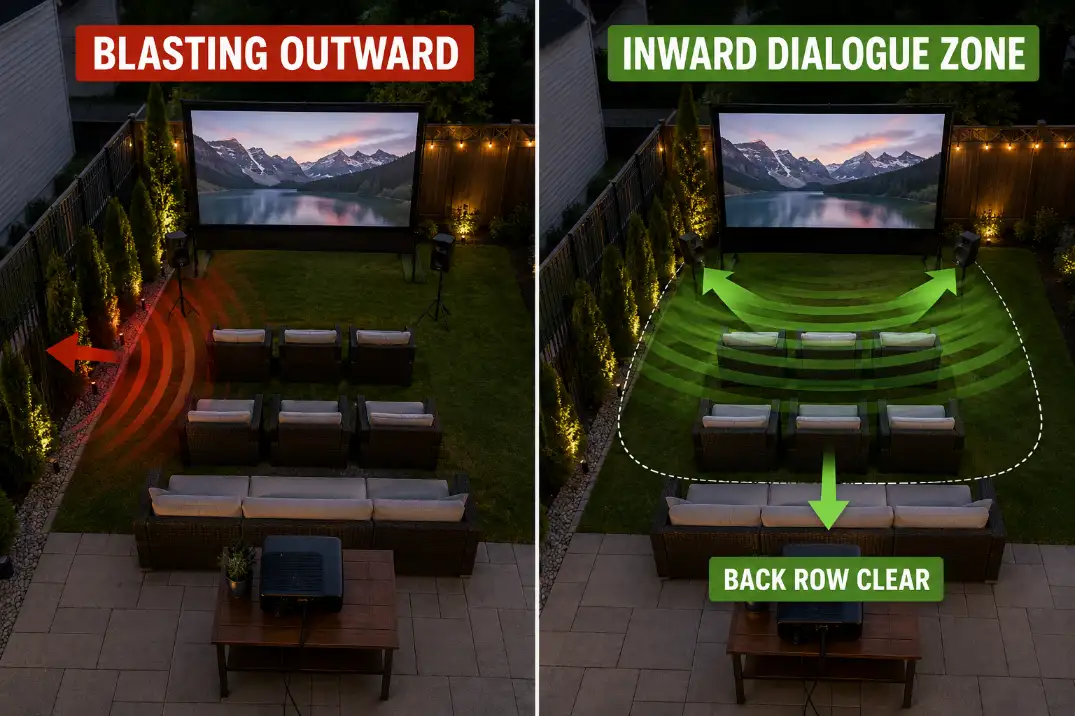
If the sound source still misses the back row or points across the yard instead of through the chairs, the upgrade does not solve the main problem.
Do not fix weak sound by blasting past the seats
The wrong fix is sending more volume outward. In a dense U.S. subdivision, especially with close side yards or privacy fences, sound that misses the seating area often reaches neighbors before it helps the back row.
The goal is not to fill the entire backyard. The goal is to create a controlled listening area where people are actually sitting.
This is also a comfort issue. Once the closest seats feel harsh, pushing the volume higher is no longer a good fix. As a practical safety boundary, repeated exposure around 85 dBA and above is where loudness becomes a hearing-risk issue, so the better answer is placement and coverage before more volume.
Fix Boundary: If one seat is too loud and another seat is still unclear, stop raising volume. Rebuild the speaker layout.
Run a 3-minute sound check
Before guests arrive, play a normal dialogue scene and set the volume from the middle row. Then walk the edges of the seating area. Check the back row, the side chairs, and the seat closest to the speaker.
If the back row needs much more volume than the front row can tolerate, change placement before changing equipment.
If the sound gets weaker only when the AC, pool pump, or nearby traffic is active, solve the noise path. If the audio is late or inconsistent, check the connection chain before blaming the speaker.
This same decision logic applies to the picture side of the setup. A large screen can make a weak projector look dim, and a wide seating layout can make a small speaker sound thin.
If you are changing screen size and audio at the same time, check brightness separately with Outdoor Projector Brightness before assuming one upgrade will solve the whole night.
Quick Diagnostic Checklist
- Play normal dialogue for 60 seconds, not music or a trailer.
- Compare the closest seat with the farthest seat, usually 12–20 feet from the screen.
- Lower the volume if the front row feels harsh before assuming the speaker is too weak.
- Move the speaker closer to the seating area before buying a larger one.
- Check the source volume, projector output, Bluetooth connection, and speaker pairing.
- Test the downwind side if dialogue fades in and out.
- Turn off or move away from pumps, fans, AC units, and snack-area noise when possible.
- Recheck sound after chairs, tables, blankets, and guests are in their real positions.
Questions People Usually Ask
Can projector speakers ever work outdoors?
Yes, but only for a very small and quiet setup. If 2–3 people are sitting close to the projector and the yard has little background noise, built-in audio may be acceptable. Once you add multiple rows, side chairs, or a 15-foot listening distance, projector audio is usually the wrong tool.
Is one Bluetooth speaker enough for backyard movies?
One Bluetooth speaker can work when the seating area is compact and the speaker is placed near the audience. It becomes unreliable when chairs spread wide, the speaker sits behind the viewers, or the farthest seat is around 20 feet away. Placement matters more than the fact that the speaker is Bluetooth.
Should speakers go by the screen or by the seats?
Speakers should support the seating area first. Near-screen placement can feel natural because voices seem to come from the image, but the speakers still need to aim clearly through the chairs.
If the screen is far from the audience, speakers closer to the front of the seating area may produce clearer dialogue.
Why does the sound feel worse after the movie starts?
The yard often gets louder after setup. Guests arrive, chairs move, snack tables shift, AC units cycle on, and background noise becomes more noticeable after sunset.
If the sound check was done before the yard was in its real viewing condition, the final setup may not match the test.
Backyard movie sound feels weak outdoors when the system is asked to fill open space instead of a controlled listening area. The practical fix is to stop treating volume as the main answer.
Put sound where people sit, test the back row before the movie starts, aim speakers inward, and solve wind or background noise only after the speaker placement is correct.
For broader official guidance on sound levels and hearing exposure, see the National Institute on Deafness and Other Communication Disorders.