Storage after a backyard movie is not one action. It is a readiness decision.
When the credits end, every component belongs in one of three states: protected now, left open to dry, or separated into a ready-for-next-time kit. Treating all three states as “put it in a bag” is how a warm projector, damp screen hem, or wet connector gets sealed before anyone notices.
The useful teardown order follows risk, not size. Protect the projector first, hold moisture-exposed gear outside closed storage, then organize dry components by the job they perform during setup. Fast cleanup matters, but a fast teardown is only successful when it leaves no uncertainty for the next movie night.
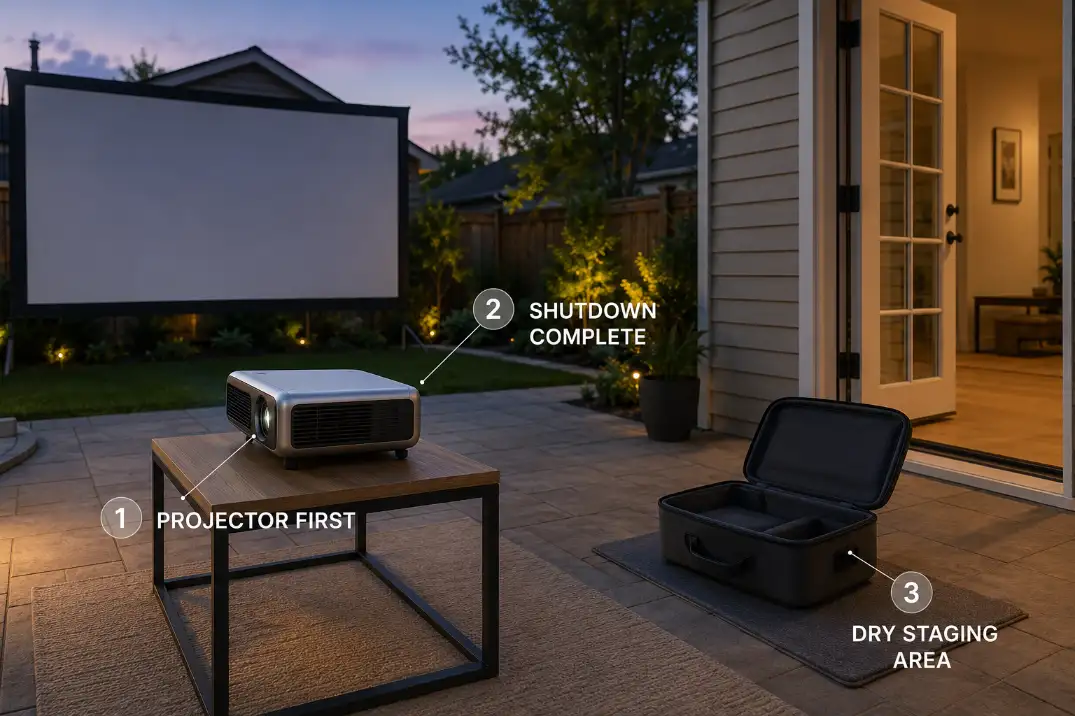
Pack the Projector First
The projector should be the first component protected, but not the first one blindly zipped into a bag.
Stop playback and use the projector’s normal shutdown control before disconnecting anything. Watch its status light and listen for continued fan operation. Some projectors run a cooling cycle after the image disappears, while others permit faster disconnection. The model’s manual and shutdown indicators control this decision; there is no universal waiting time.
While shutdown finishes, clear drinks, chairs, screen parts, and loose cables away from the projector table. This protects the most sensitive component before people begin carrying larger equipment through the dark yard.
Once the projector indicates that shutdown is complete, disconnect power and signal cables without pulling on the cords. Check the lens area, vents, feet, and underside for visible moisture or grass residue. Replace the lens cover and retract adjustable feet when applicable.
If the projector received rain, direct splash, or uncertain moisture exposure, do not treat it as a normal dry teardown. Follow the more cautious process for how to check a projector after rain or uncertain moisture exposure.
Move a normally dry projector into its padded case only after shutdown is complete. Check the case lining as well. A damp fabric case can reintroduce moisture even when the projector never touched wet ground.
Shutdown Check: “Projector first” means first priority and first protected component. It does not mean closing the case while shutdown or cooling is still in progress.
Let Screens and Cables Dry Before Storage
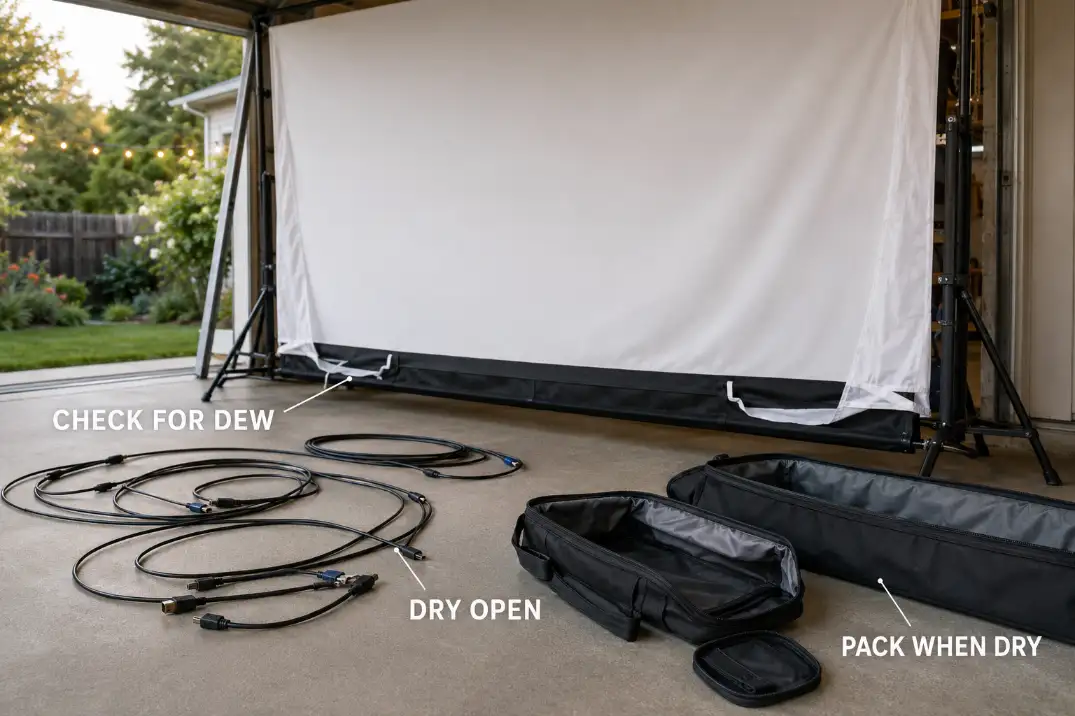
A screen or cable is storage-ready only when its seams and connectors are dry—not merely when the largest visible surface feels dry.
Check both sides of the screen, then inspect the lower hem, corner pockets, frame sleeves, attachment points, and any section that rested near grass. Dew often collects along edges and stitched areas before the center feels wet.
Keep a damp portable screen unfolded or loosely opened in a clean, sheltered space. Do not force it into a smaller bag with sharp folds just to finish cleanup. Folding pressure combined with moisture can leave creases and surface marks that are harder to release during the next setup.
Screen materials do not all tolerate folding and storage pressure the same way. The guide to the storage behavior of different outdoor screen materials covers those differences without turning this teardown into a material-care article.
Cables need the same drying hold. Check their jackets, plug ends, HDMI connectors, speaker connections, and any section that crossed grass or rested near a patio edge. Wipe visible surface moisture with a clean dry cloth when appropriate, then place each cable in loose open loops so air can reach the jacket and connector ends.
Humidity, airflow, material, and exposure determine drying time. A fixed number of minutes is less useful than a physical check. If a seam, sleeve, connector, or cable end still feels uncertain, it stays outside the closed bag.
Keep all drying components away from the projector case, speakers, remotes, power bricks, and clean fabric bags. Leaving damp gear open overnight in a protected area is better than sealing the problem inside a bin.
Keep Speakers Away From Moisture
The useful test is not whether a portable speaker continued playing. It is whether moisture remains around the places that will be enclosed during storage.
Disconnect the speaker and move it to a dry protected area. Check its underside as well as the grille, handles, charging port, input panel, rubber feet, and cable connections. Recessed areas can remain damp after the main housing looks dry.
Follow the manufacturer’s instructions for protective port covers. Depending on the design, a cover may need to remain in a particular position during drying. Do not guess based on another speaker.
Weather resistance during use is also different from damp storage. A speaker may tolerate normal outdoor exposure while operating but still hold moisture against a charging connector or inside a fabric case. Do not begin charging while the port, cable, or connector is damp.
If exposure remains uncertain, keep the speaker away from the projector and other dry electronics. It belongs in the drying group until it passes inspection.
Use Separate Bags for Power Gear
Power gear should enter ready storage only after passing two gates: dry connections and no physical warning signs.
Keep extension cords, power bricks, grounded adapters, splitters, and connection covers in a dedicated bag or dry holding area. Do not place a power brick against a screen, tarp, or fabric case that may still contain moisture.
Signal gear belongs elsewhere. HDMI cables, audio leads, remotes, streaming-device accessories, and lens items are easier to protect when they are not pressed underneath heavier cords and adapters.
Before closing the power bag, look for crushed sections, cuts, stiffness, loose plug ends, discoloration, or unusual warmth noticed during the movie. The U.S. Consumer Product Safety Commission’s extension-cord guidance reinforces the importance of inspecting cords and removing damaged ones from use.
A questionable component should go into a visible repair-or-replace area. Returning it to the power kit makes the label on the bag misleading: the kit looks complete, but it is not ready.
For cords or connectors exposed to dew, damp grass, or splash, use the deeper process to inspect and dry weather-exposed AV connections before returning them to storage.
Label the bag by its job rather than calling it simply “cords.” PROJECTOR POWER or SCREEN + BLOWER POWER makes a missing adapter easier to notice before the next movie begins.
Avoid Tangled Cable Bins
A neat-looking bundle can be worse than a loose bin when the loops are forced, connectors are buried, or several cables must be pulled apart before one can be used.
Let each cable follow its natural curve. Form loose loops without sharp bends, twists, or tension near the connector. Do not wrap a cable tightly around your hand, elbow, power brick, projector, or another accessory merely to make it smaller.
Secure each coil individually with a reusable tie. Keep HDMI and other signal connectors where heavier extension cords or metal adapters cannot press against them.
Label cables by job when several look alike: MAIN HDMI, PROJECTOR POWER, SCREEN BLOWER, SPEAKER LINK, or EXTENSION ROUTE. Functional labels make the next setup faster and expose a missing cable immediately.
Coiling is also the last convenient inspection point. Cuts, flattened sections, stiff bends, and loose connectors are easier to notice while the cable passes through your hands than after it disappears into storage.
One mixed cable bin can still work when every cable is dry, individually secured, visible, and identifiable. The goal is not perfect circles. It is a cable that uncoils without dragging the rest of the system with it.
Build a Fast Next-Night Setup System
The strongest storage system is arranged around setup dependency: the equipment needed first should be easiest to reach.
Use a small number of functional modules instead of one miscellaneous bin. A practical system might include a screen kit, power kit, projector kit, and sound kit. Keep small parts with the system that uses them—stakes and ties with the screen, the correct remote and adapter with the projector, and charging or signal leads with the speaker.
Use short exterior labels that remain readable in garage light or after sunset. PROJECTOR KIT is more useful than ELECTRONICS, and SCREEN HARDWARE is more useful than EXTRAS.
Do not let storage hide unfinished work. Create a separate, visible holding area for anything that still needs to dry, be tested, repaired, or replaced. An item in that area is intentionally unavailable; a questionable item inside a ready bag is an unknown failure waiting for setup night.
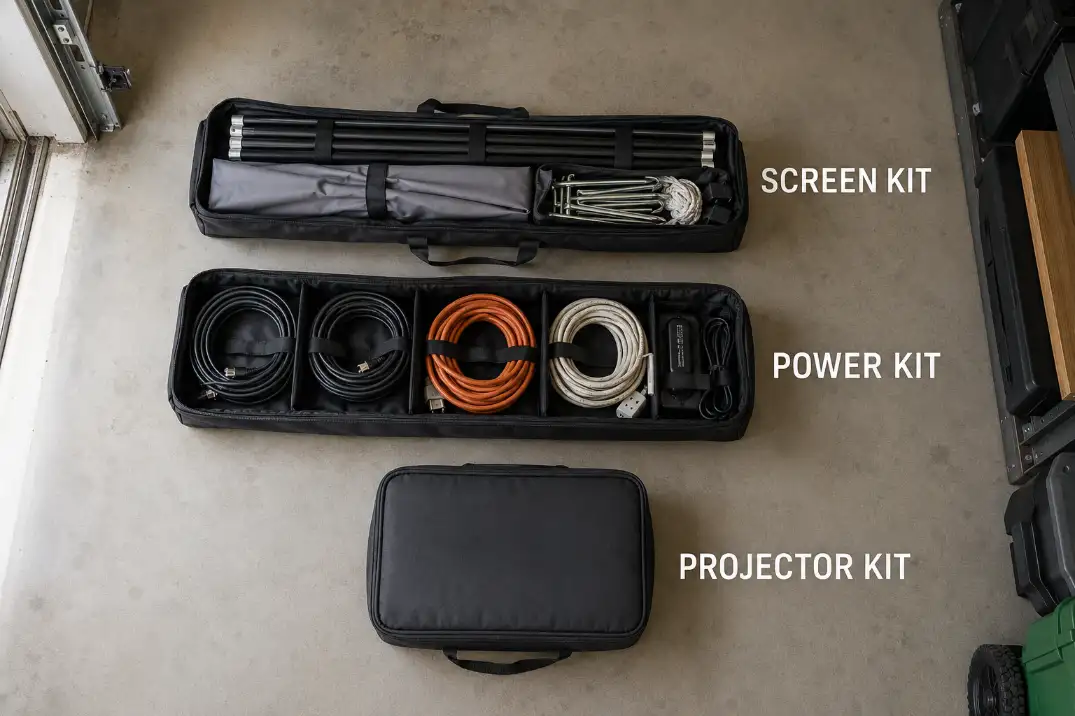
Use this reset check before closing the final ready bag:
- The projector completed its normal shutdown before the case was closed.
- Screen material, seams, cables, and connectors are fully dry.
- Speaker ports and charging areas have no visible or uncertain moisture.
- Power components were inspected and separated from signal gear.
- Each cable is loosely coiled, individually secured, and identifiable.
- Questionable equipment remains outside the ready system.
- The first kit needed during setup is accessible without unloading everything else.
When repeated packing becomes the hardest part of hosting, it may be worth reconsidering whether a pack-away system still fits the way the yard is used. That is a larger system decision, not a reason to leave temporary equipment exposed between events.
The best teardown is not the one that empties the yard fastest. It is the one that leaves no unknowns: protected electronics, fully dry soft gear and connectors, and ready bags whose contents can be trusted. Once those conditions are met, storage becomes the first successful stage of the next movie night.