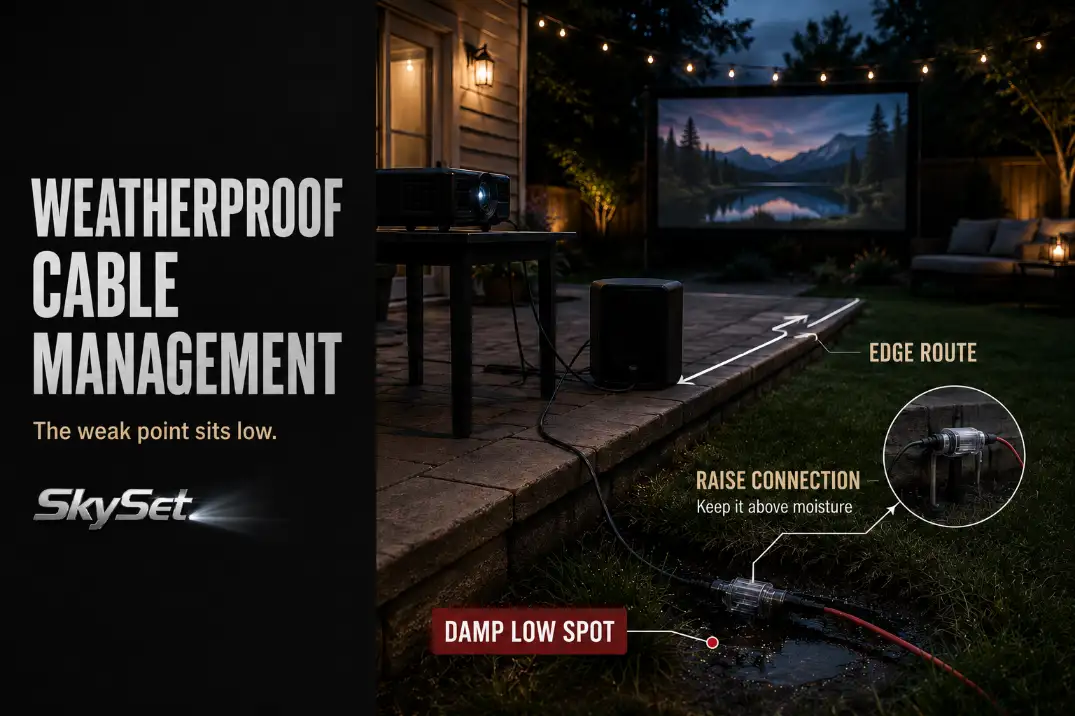
Weatherproof cable management for outdoor AV is not mainly about hiding cords. It is about controlling the weak points that usually fail first: the plug connection, the outlet side, the cable route, and the cleanup after the movie.
A projector can shut off, an HDMI signal can flicker, or a speaker can hum for reasons that look like equipment failure but actually start with moisture, strain, heat, or a bad walking path.
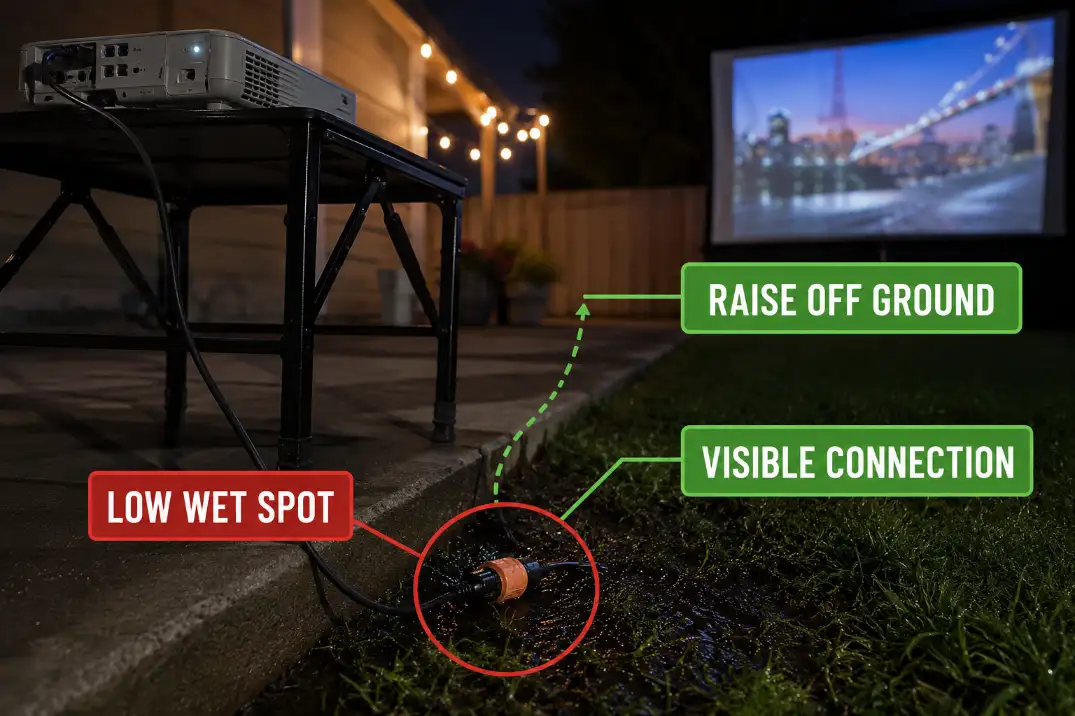
Start with three checks. Keep plug connections at least 6–12 inches above damp grass or patio runoff.
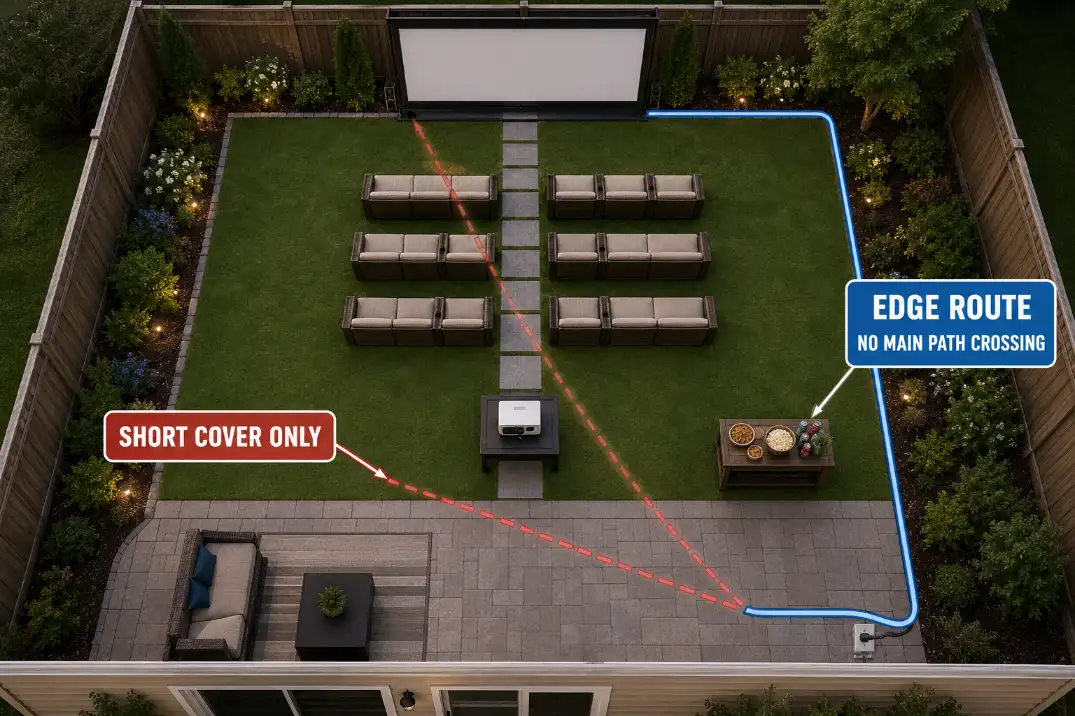
Avoid any main-path cable crossing longer than 3–6 feet. After 20–30 minutes of use, stop and inspect any cord, adapter, or power brick that feels warmer than expected. A weatherproof box helps only after the connection is already in a smart location.
Cable Exposure: Temporary Setup vs. Left-Out Cord
One movie night is different from one outdoor season
A temporary outdoor AV setup can be managed safely when the cable run is visible, dry, correctly rated, and removed after use.
The risk changes when the same cord stays outside for days or weeks under sun, dew, sprinklers, chair legs, pets, and foot traffic.
That distinction matters because many backyard movie problems are not caused by dramatic weather. They come from ordinary exposure repeated too many times.
A cable that looked fine during one dry evening may become stiff, kinked, or unreliable after several weekends of being dragged across patio edges and packed away damp.
If the main issue is where power enters the setup, the route logic in Backyard Projector Power Setup Without Cable Hazards should be solved before weatherproofing accessories are added. A bad route does not become safe just because the connection is covered.
Check the cord before you manage the cord
Do not build a careful cable plan around the wrong cord. An indoor extension cord should not be used outside for a backyard AV setup.
Outdoor AV power should use an outdoor-rated extension cord in good condition, with a jacket that bends smoothly and plug ends that feel tight.
Look for cuts, crushed sections, exposed wire, burn marks, stiffness, pale stress lines, and loose plug ends. The most common waste of time is organizing a cable that should be replaced.
If a cord only works when bent a certain way, feels unusually stiff, trips protection more than once, or gets warm under normal projector load, routing is no longer the main problem. The cable has moved from “manage it” to “stop using it.”
UV Damage: When Sun Aging Looks Like Normal Stiffness
The early warning is not always a crack
UV damage is easy to underestimate because the first sign may not be a split jacket. The cable may simply feel harder, flatter, chalkier, or less willing to coil.
A healthy outdoor cord should bend into a loose loop without sharp memory bends. A failing one starts to hold kinks, especially near the plug ends.
Dry climates can make this look harmless. In Arizona or inland California, a cable left in direct summer sun for 4–6 weeks may age even if it never gets rained on.
The surface may still look usable, but the jacket can become less flexible and more vulnerable to cracking when stepped on, bent, or wrapped tightly.
Shade is better than decorative hiding
The obvious fix is often the wrong one: pushing cable under a rug, mat, blanket, or furniture leg to make the patio look cleaner. That may hide clutter, but it also hides damage, traps heat, and can hold moisture against the cable after dew or light rain.
A better fix is a shaded edge route, a shorter run, or a different AV layout that keeps cables away from the hottest and busiest part of the patio.
If the cable must remain visible for safety, that is not a design failure. Visible and protected is better than hidden and stressed.
Moisture Risk: The Low Connection Fails First
Outlet side and connection side are separate decisions
Moisture risk has two different zones. The outlet side needs an outdoor-safe receptacle setup, GFCI protection, and a weatherproof while-in-use cover when a plug is connected.
The connection side needs to stay raised, visible, and out of runoff paths, lawn dips, and sprinkler mist.
People often overestimate a storage box and underestimate the ground. A box sitting in the wrong low spot can still collect splash, condensation, or trapped moisture around the plug.
The better order is simple: place the connection correctly first, then protect it.
This matters most in humid Florida evenings, coastal yards, and Midwest nights when dew forms before the movie is over. A cable can look dry at setup and still be damp by teardown, especially where grass meets concrete.
A GFCI trip is a symptom, not the diagnosis
A tripped GFCI should not be treated as a small annoyance. It is a signal that the setup needs inspection. The underlying issue may be moisture, damaged insulation, a faulty device, overload, or a connection sitting where it should not be.
Resetting once after correcting an obvious problem is different from resetting repeatedly and continuing the movie. If protection trips again, stop the setup, disconnect from the source, inspect the cable and plug ends, and let damp components dry before storage. Repeated trips are not a reset routine. They are a setup fault.
Patio Crossings: The Shortest Route Becomes the Trip Route
Straight lines often cut through the real walking path
The shortest cable route from outlet to projector table is often the route people notice least before sunset and trip over most after dark.
A diagonal cord across the patio may look efficient during setup, but it often crosses the natural path between the house, snack table, seating, and screen.
A safer route usually follows the patio edge, fence side, planter line, or back of the seating area. That may add 10–15 feet of cable, but it keeps the cord out of the zone people use without thinking.
This is the same kind of layout mistake that can make a clean backyard movie setup feel awkward in practice, which is why Backyard Movie Setup Mistakes should be read as a movement-pattern guide, not only a gear checklist.
Covers are for short crossings, not bad routes
Cable covers make sense when a crossing is short, visible, and unavoidable. They do not make a long center-patio cable run ideal.
Use this practical boundary: if a crossing is longer than 3–6 feet, try harder to reroute. A short covered crossing near an edge is manageable.
A long covered crossing through the middle of the seating area becomes another object guests must step over in low light.
Storage Boxes: Protection Only Works After Placement
A box protects a good connection; it does not rescue a bad location
Weather-resistant storage boxes and cord connection covers are useful, but they are easy to overvalue. A box can reduce splash, dust, and accidental contact. It cannot make a puddle zone smart, fix a damaged cord, or turn a temporary extension cord into permanent outdoor wiring.
The best box setup is simple: it is sized so plugs are not bent, positioned above the wet zone, easy to open for inspection, and not stuffed with heat-producing adapters.
A sealed plastic container around an operating power brick can trade moisture risk for heat risk, especially during longer summer events.
Quick Test: If you would not leave the connection exposed in that exact spot for five minutes, do not assume a box makes the spot good.
Power, HDMI, and speaker cables fail differently
Power cables, HDMI cables, and speaker cables should not be managed as if they have the same job. Power cables need the safest route, correct rating, dry connections, and GFCI-protected supply.
HDMI cables need gentle bends and strain relief because a tight bend can create flicker, signal dropout, or a picture that only works when the cable sits a certain way.
Speaker cables often create a different problem: they follow the speaker placement. If better audio puts speakers closer to the seating area, the cable route must be reconsidered at the same time.
The placement guidance in Outdoor Speaker Placement for Backyard Theater is more useful when cable paths are included early, not after the speakers are already in the right sonic position but the wrong walking zone.
A practical storage habit helps here. Coil HDMI cables loosely in loops around 6 inches or wider, keep power and signal cables separated, and label cables by role. The goal is not neatness for its own sake. It is faster setup and earlier damage recognition.
Cleanup Routine: Weatherproofing Continues After the Movie
The teardown check prevents the next failure
The most overlooked weatherproofing step happens after the screen is off. People inspect cables when setting up, then pack them away tired, damp, and tangled. That is how small moisture and jacket problems get stored for the next event.
Use a short teardown routine. Unplug at the source first. Check plug ends. Wipe visible moisture. Look for cuts, flat spots, stiffness, and warm adapters.
If there was dew, sprinkler mist, wet grass, or rain nearby, leave cords and connectors open to dry for 12–24 hours before closing the storage bin.
For a full event workflow, this teardown check belongs beside screen position, seating, projector placement, and sound checks in Backyard Movie Night Setup. Cable weatherproofing works best when it is part of the setup rhythm, not a last-minute repair.
When cable management stops being the answer
At some point, better cable organization is not enough. If the setup regularly needs more than about 50 feet of extension cord, crosses the same walkway every time, trips protection more than once, or requires cords to stay outside for multiple days, the layout needs to change.
That may mean moving the projector table, using a different outdoor outlet, shortening the AV chain, choosing battery-powered accessories where appropriate, or having a qualified electrician add a properly located outdoor receptacle. More tape, darker cords, and larger boxes will not fix a bad power location.
Use this final check before the next movie night:
- Plug connections are raised at least 6 inches above damp grass, patio runoff, or low seams.
- The main walking path has no cable crossing longer than 3–6 feet.
- The cord jacket bends smoothly with no cracks, pale stress marks, crushed spots, or stiffness.
- The outlet side has GFCI protection and a suitable cover for use while plugged in.
- The power brick is protected from splash but not sealed in a heat-trapping container.
- Damp cords dry open for 12–24 hours before closed storage.
- A second GFCI trip, warm cord, or unreliable signal triggers inspection or replacement, not another reset.
Questions People Usually Ask
Can outdoor AV cables stay outside overnight?
One dry night may be manageable if the cables are outdoor-rated, unplugged when not in use, raised off wet ground, and not placed across a walking path.
Leaving the same setup out for days or weeks is different because sun, dew, sprinklers, and foot traffic create repeated exposure.
Is electrical tape enough to weatherproof a plug connection?
No. Tape may help mark or bundle a low-risk cable, but it is not a reliable weatherproofing fix for an outdoor plug connection. If the connection is too low, damp, strained, or hidden, tape hides the problem instead of correcting it.
Should I replace a cable that still works?
Yes, if the jacket is cracked, the plug end feels loose, the cable gets warm, or the signal only works when the cable is bent a certain way. A cable that still functions but shows physical failure signs is no longer a cable management issue.
For broader official safety guidance, see the U.S. Consumer Product Safety Commission extension cord guidance.