An actor’s mouth closes, but the corresponding word reaches the seating area a moment later. That repeatable mismatch confirms a synchronization problem, but it does not prove that the Bluetooth speaker alone is responsible.
In an outdoor movie setup, sound may pass through a streaming app, source device, projector, transmitter, receiver, and speaker before it becomes audible. Any stage that processes or relays the audio can affect when it arrives.
The useful question is not “Which device is bad?” It is “At which link does the delay first appear?” Replay the same short scene while changing one link at a time. That controlled test reveals more than moving equipment or changing several settings together.
Why Outdoor Setups Show Delay
A real lip-sync problem follows a visible event. A mouth moves before the matching speech is heard, or an impact appears on screen before its sound arrives. The offset should remain noticeable when the same scene is replayed.
Poor dialogue clarity can feel similar without being a timing fault. Wind, background activity, projector fan noise, and weak speaker coverage may make words difficult to understand even when they arrive at the correct moment.
If the lips and voice remain aligned but the words sound faint or masked, diagnose outdoor dialogue that sounds weak rather than late instead of changing synchronization settings.
Trace the Complete Playback Chain
A simple outdoor audio path might be:
Source → Bluetooth speaker
A more complicated path might be:
Streaming app → source device → projector → audio output → Bluetooth transmitter → speaker
The second route contains more processing stages. If two speakers are linked wirelessly or a separate receiver is added, the chain becomes longer again.
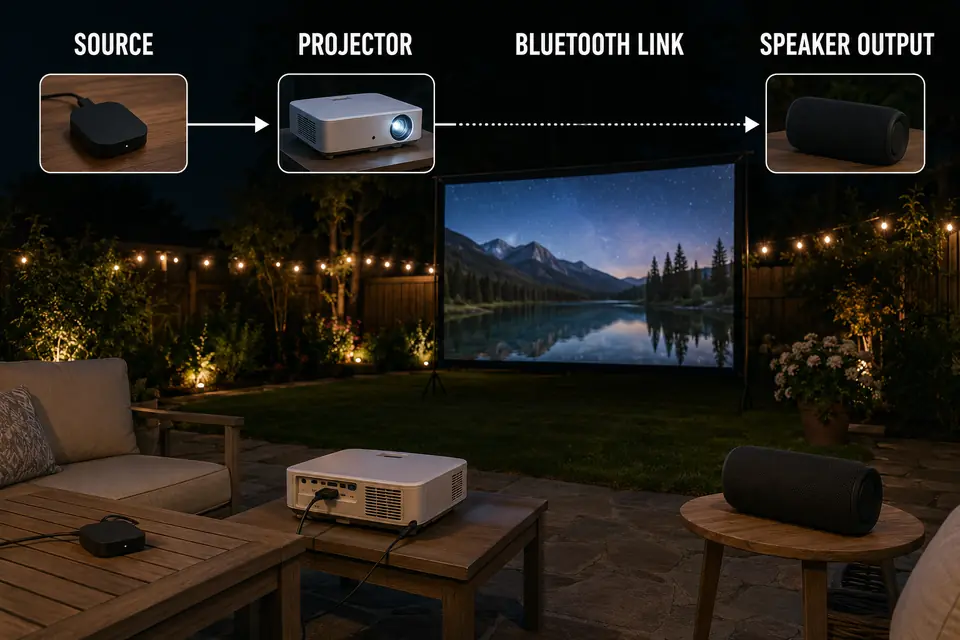
Choose a repeatable 30–60-second clip containing close-up dialogue, a hand clap, a closing door, or another action with an obvious visual and audible moment. Watch it from an actual audience seat rather than beside the projector.
FIELD CHECK: Replay the same scene and change only one device, connection, or synchronization setting. If several parts change together, the test cannot identify where the delay begins.
Bluetooth Speaker Latency
The first decision is whether the mismatch appears only when sound travels through the Bluetooth speaker path.
Bluetooth audio must be prepared, transmitted, received, decoded, buffered, and played. The connection can produce strong, uninterrupted sound that still arrives late. Clear audio proves that the connection is stable; it does not prove that the picture and sound are synchronized.
Compare Bluetooth With One Other Output
Play the same scene through the Bluetooth speaker. Then change only the audio output.
Depending on the available equipment, the comparison path could be:
- The projector’s built-in speaker
- A direct audio output
- One speaker instead of a linked pair
- Another connection that bypasses Bluetooth
Do not compare volume or overall sound quality during this test. Watch for one result: does the timing improve when the Bluetooth path is removed?
If the picture and sound align through the comparison output but separate again through Bluetooth, the wireless path is implicated. This does not necessarily mean the speaker is defective. The delay may be introduced by the source’s wireless handling, the speaker’s internal processing, or the interaction between them.
Bluetooth audio behavior depends on the complete source-to-output implementation. The Bluetooth SIG overview of LE Audio discusses latency and synchronized audio as features of the wider audio system, not guarantees created by one component alone.
Do Not Confuse Distance With a Fixed Offset
Longer distance, walls, people, and other obstructions can contribute to dropouts, interruptions, or reconnection. They should not automatically be blamed for a consistent offset that repeats during the same scene.
Move the speaker closer only as a controlled test. If interruptions disappear but the lip-sync error remains, distance affected connection stability rather than the underlying timing.
Linked portable speakers also require a separate test. Stereo pairing, relay modes, and party modes can add another synchronization stage. Test one speaker first, then activate the linked arrangement without changing the source or clip.
Clear sound can still arrive late. If synchronization is only one part of a broader system decision, separately consider whether Bluetooth still fits the wider backyard setup.
Streaming Device Sync Issues
The next decision is whether the delay follows the streaming source or remains present across every source.
If the problem occurs in only one app, the Bluetooth speaker is less likely to be the sole cause. The app, source device, content format, or that particular playback route may process audio and video differently.
Test Whether the Delay Follows the Source
Keep the projector, speaker, Bluetooth connection, and seating position unchanged. Play a comparable dialogue scene through another app or a locally available test clip.
A mismatch limited to one app points toward that app or source. A delay that remains across every app and clip shifts suspicion toward the device output, projector processing, Bluetooth link, or another component farther along the chain.
Test more than one scene before drawing a conclusion. A single video can contain its own synchronization error and make an otherwise functional outdoor setup appear faulty.
Check Sync Controls Carefully
Look for settings named:
- Audio delay
- AV sync
- Lip-sync
- Wireless audio calibration
- Audio synchronization
Not every device provides these controls, and manufacturers may present the direction of adjustment differently.
Record the original value before changing it. Make one small adjustment, replay the identical scene, and restore the starting value if the mismatch becomes worse.
Automatic compensation may also behave differently after a new speaker is paired or the audio output changes. Reconnecting or restarting the playback chain can cause the devices to establish the route again, but restarting is not a diagnosis. The useful evidence is whether the delay returns through the same connection.
Transmitter and Receiver Limits
The next test determines whether an additional transmitter, receiver, projector output, or speaker relay is the first link that makes the sound visibly late.
A separate Bluetooth transmitter can make an older projector or source compatible with a wireless speaker. Successful pairing proves only that the devices can communicate. It does not prove that their combined processing will provide acceptable lip-sync.
Find the First Added Stage That Changes Timing
Compare the shortest available path with the complete outdoor path.
For example:
Direct source → Bluetooth speaker
Source → projector → audio output → Bluetooth transmitter → speaker
Remove one intermediary device while leaving the rest of the system unchanged. If the delay begins only when the transmitter is added, that added path becomes the main suspect—even when the connection remains clear and stable.
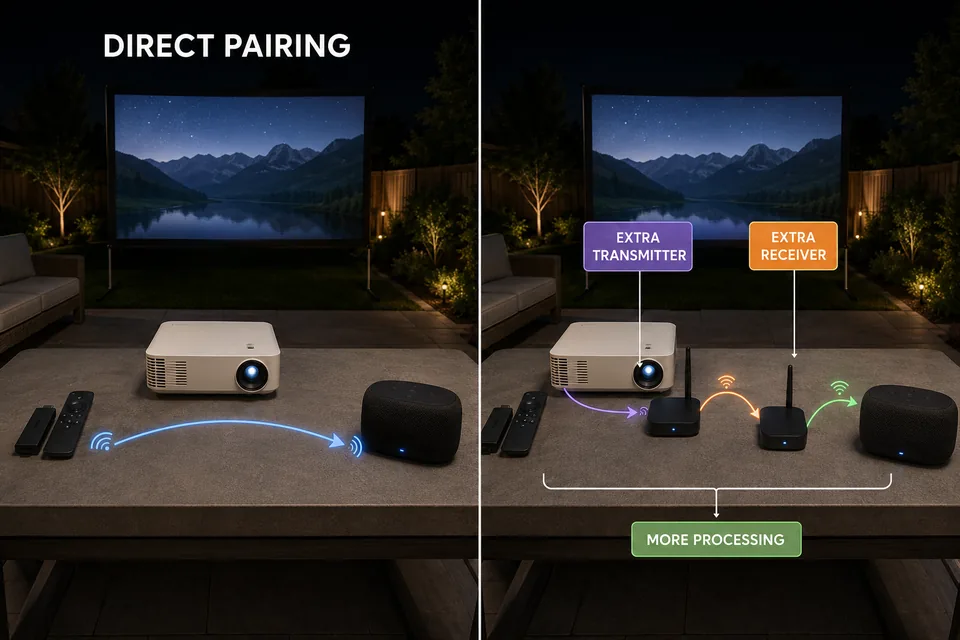
Adapters, receivers, and speakers may each hold or process audio before forwarding it. When several stages are combined, their effects can stack. There is no useful universal millisecond figure because the final result depends on the complete device combination and playback route.
Dual-speaker pairing and relay modes require the same isolation. Test one speaker directly, then activate the second speaker while keeping the source and test clip unchanged. If the sound becomes later or the speakers no longer feel synchronized, the additional pairing mode is part of the problem.
Do not change the app, transmitter, speaker mode, and sync control simultaneously. The setup might improve, but you will not know which change mattered or how to reproduce the result.
| Visible Pattern | Isolation Test | Likely Layer | Next Move |
|---|---|---|---|
| Delay occurs only through Bluetooth | Replay through an available direct output | Bluetooth audio path | Test one speaker and the shortest pairing route |
| Delay appears in one app only | Keep the equipment unchanged and switch apps | App or source processing | Check the app and source sync behavior |
| Delay begins when an adapter is added | Remove only the transmitter or receiver | Added adapter stage | Shorten or bypass that path |
| Two wireless speakers feel late or drift | Test one speaker and then restore pairing | Pairing or relay processing | Use the stable single-speaker path |
| Delay remains through every tested output | Compare another source or known test clip | Source, projector, or content | Move upstream and isolate the source |
Lip-Sync Test Before Guests Arrive
The final test must confirm that the chosen playback path remains synchronized after all intended components are connected.
Perform it with the source, projector, speaker, and audio route in their movie-night positions. Do not consider the setup finished because one short clip appears correct while you are standing beside the equipment.
Use One Repeatable Scene
Choose a 30–60-second segment containing visible speech or a distinct visual and audible event. Watch it from a normal audience seat.
Replay the same segment after every single change. If an AV-sync adjustment makes the mismatch worse, return it to the recorded starting value before testing another link.
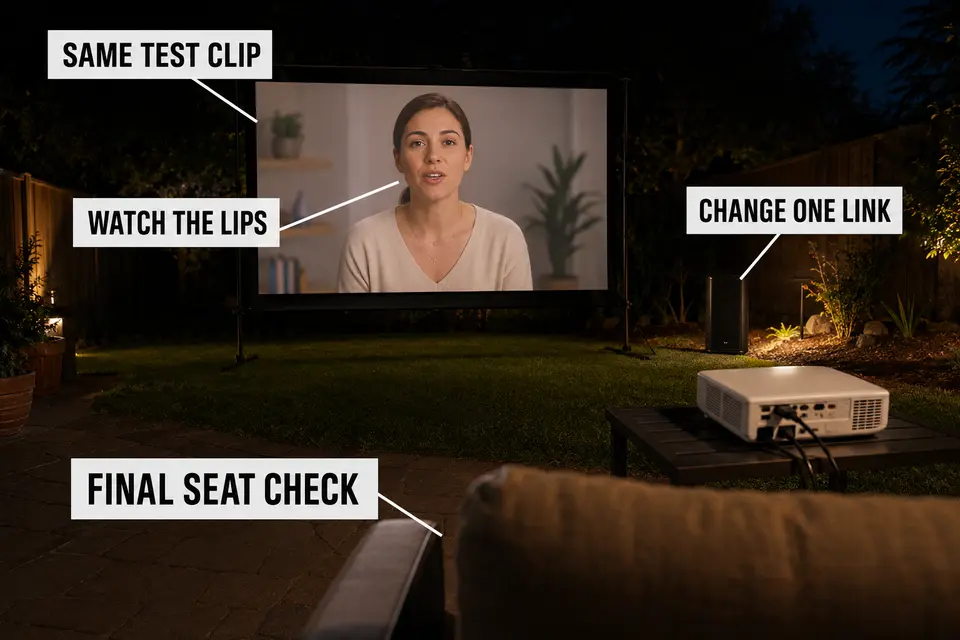
Complete this check approximately 15–20 minutes before guests arrive. This does not guarantee perfect stability, but it leaves time to compare a simpler audio route before the movie begins.
Check again after the complete system has been operating, particularly when the original problem was intermittent or appeared only with certain sources.
Lip-Sync Field Checklist
- Connect the final source, projector, speaker, and audio route.
- Select one repeatable 30–60-second test clip.
- Watch from an actual audience seat.
- Change only one connection or sync setting per replay.
- Confirm the result with a second clip or app.
- Recheck after the complete system has been operating.
The test is complete when the selected path remains acceptably synchronized under the conditions in which the movie will actually play.
When Wired Audio Is Safer
Wired audio is not required for every outdoor movie. It becomes the more dependable choice when bypassing the wireless path repeatedly removes the visible delay.
That evidence is strongest when the mismatch appears across several apps, disappears through a direct connection, and returns whenever the Bluetooth transmitter, receiver, or speaker path is restored.
Choose Reliability by Use Pattern
A wired connection is a stronger fit when:
- A transmitter-and-receiver chain cannot maintain acceptable synchronization.
- The setup is used frequently and must behave predictably.
- Dialogue-heavy movies make a visible mismatch distracting.
- Bypassing Bluetooth consistently corrects the timing.
The improvement comes from removing processing stages, not from raising the volume or repositioning the speaker.
Keep Bluetooth when the shortest tested wireless path remains synchronized during the final seat check. Choose wired audio when bypassing the wireless path consistently removes the delay.
The trade-off is physical cable management. Once wired audio is selected, route the connection away from walking paths instead of stretching it through the seating area or improvising after guests arrive.