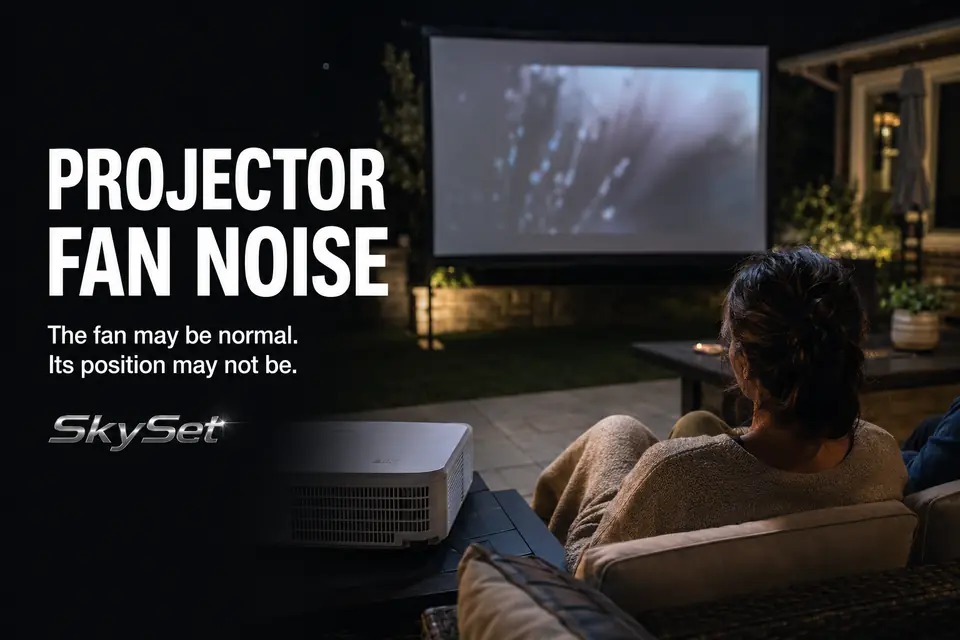
A projector fan may disappear beneath music and action, then become the clearest sound in the yard as soon as a scene drops to quiet dialogue. The first question is not simply whether the projector is loud. It is whether the seating position has a short, unobstructed listening path to ordinary cooling noise.
Outdoor use does not guarantee that mechanical sound will fade into the background. A calm yard may provide less masking than an indoor room with air conditioning, appliances, and other continuous sounds. That makes a normally operating fan seem unusually prominent when the projector sits beside a chair or between viewers and the screen.
Diagnose the problem from the normal viewing position, not with an ear held beside the projector. Listen to the character of the sound and note when it becomes distracting. Smooth, steady airflow points first toward distance, direction, speaker coverage, or ventilation. Rattling, scraping, grinding, repeated surging, or a sudden change from previous movie nights crosses into a different inspection path.
Why Fan Noise Feels Louder Outside
The first diagnostic distinction is fan output versus fan exposure. An open yard may not make the projector produce more noise, but it can leave that noise with a direct path to the nearest listener and little competing background sound.
The effect is clearest during menu screens, pauses between lines, restrained soundtracks, and scenes where speech is intentionally quiet. During an action sequence, the fan may operate at the same speed but disappear beneath the soundtrack. The symptom changes because the masking sound changes, not necessarily because the fan does.
Nearby hard surfaces can add to the problem. A concrete patio, fence, exterior wall, or projector table tucked into a corner may return some sound toward the seats. These reflections are usually less influential than close proximity, but they can make an exposed position worse.
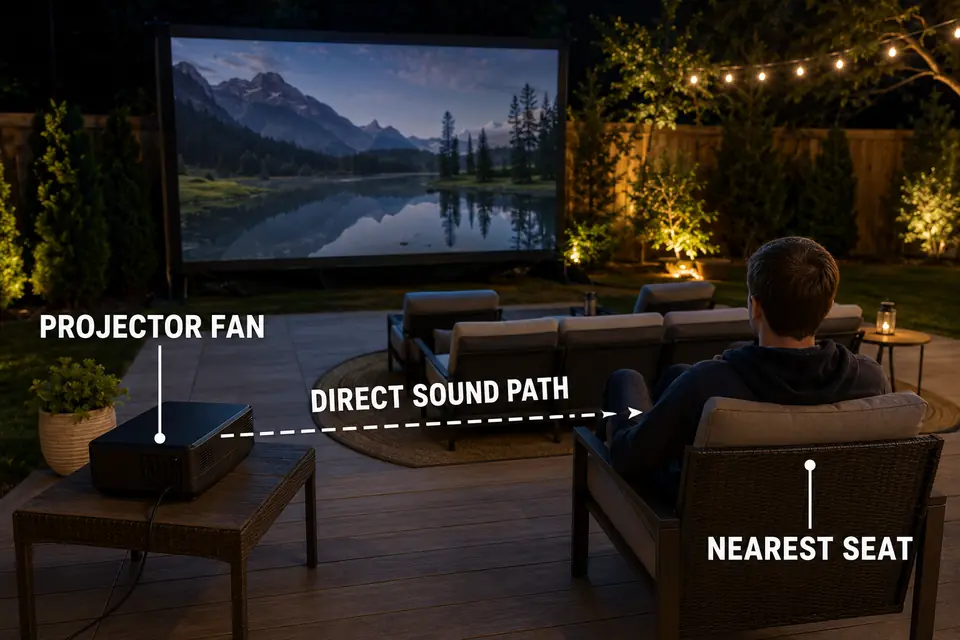
A smooth rush of air can be normal and still be badly positioned. A new rattle, scrape, pulse, or abrupt rise and fall should not be treated as an acoustic-layout problem. That sound deserves inspection under the manufacturer’s guidance rather than louder speakers or another seating adjustment.
Projector Distance From Viewers
Test projector-to-viewer distance before changing the audio system. For fan-noise diagnosis, the relevant distance runs from the projector to the nearest occupied head position—not merely from the projector to the screen.
A projector can satisfy its image throw requirement while sitting only a few feet from someone’s ear. Temporarily increase that listening distance, preserve a workable image, and replay the same quiet passage at the same audio level. A clear reduction identifies proximity as a controlling part of the problem.
There is no universal distance at which every projector becomes quiet. Cooling design, operating mode, ambient temperature, yard noise, and listener sensitivity all vary. The useful threshold is practical: the smallest relocation that makes the fan recede from attention at occupied seats.
Relocation still has to preserve the picture. Moving the unit can alter image size, focus, alignment, and reliance on digital keystone correction. The broader outdoor projector placement problems become relevant when a quieter acoustic position creates a visibly worse image or places the beam across a walking route.
Do not commit to the new position during the first quiet moment. Let the projector reach its normal operating condition, repeat the scene, and check the nearest seat again. A move that helps only before the cooling system settles has not solved the real-use problem.
Table Placement Behind Seating
A position behind the seating line is worth testing when direction matters more than a small increase in distance. Fan noise arriving from behind viewers generally draws less attention than the same steady sound operating beside someone’s head or directly between the audience and screen.
This is not a universal instruction to put every projector behind every chair. Center the projector as naturally as the site permits, stabilize the table, and confirm that the lens clears seated viewers. Then check what happens when someone stands, enters late, or crosses behind the last row. A location that quiets the fan but repeatedly throws silhouettes across the screen has exchanged one failure for another.
Projector height matters in this position. The beam should clear the seating area without an unstable stack of boxes, excessive tilt, or heavy digital correction. Guidance on projector stand height for backyard movies can help resolve that constraint without turning the noise diagnosis into a complete equipment-selection exercise.
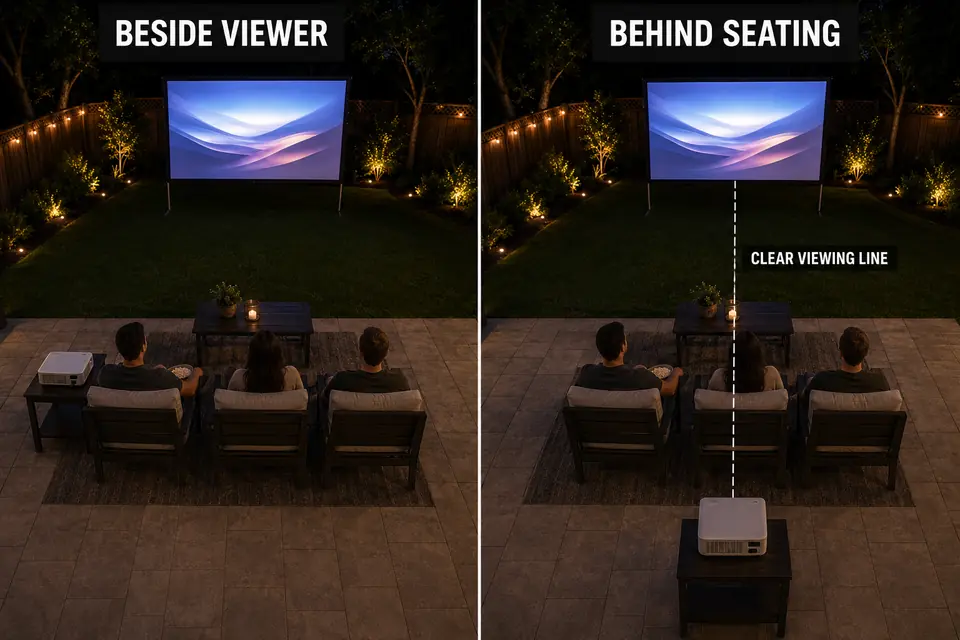
Inspect the route around the new table as carefully as the image. Power and signal cables should not cut across an entry path simply because the acoustically quieter location is farther back. If relocation creates that conflict, apply the principles for outdoor AV cable routes near walking paths before accepting the position.
Listen from the rear row as well. Moving the fan behind most viewers can place it beside someone else or next to a frequently used path. The correct position is the one that lowers fan awareness across occupied seats while keeping the beam, table, and circulation route workable.
Speaker Balance During Quiet Scenes
If the fan becomes distracting only where dialogue is weak, test audio coverage before moving the projector again. Music and effects may carry across a patio while voices lose clarity at the outer or rear seats, leaving the fan exposed during the quietest parts of the soundtrack.
Use spoken dialogue at the intended movie volume and listen from the nearest, central, and farthest seats. If speech is clear in one position but strained elsewhere, uneven coverage is contributing to the symptom. Raising the master volume may make action scenes uncomfortable without fixing dialogue at the weaker seat.
Speaker direction and distribution matter more than trying to overpower the projector. The separate diagnosis for movie dialogue that is hard to hear outside can help when voices weaken across the seating area. Audio adjustment should make normal content intelligible; it should never conceal a new grinding, rattling, or surging sound.
Enclosure Airflow Problems
If the fan became more persistent after adding weather protection or moving the projector onto a tight shelf, test airflow before blaming the seating layout. A partial enclosure can reflect sound, trap exhaust heat, or feed warm air back toward the intake.
As internal temperature rises, the projector may respond with faster or longer cooling cycles. The enclosure can therefore create both parts of the complaint: more fan activity and a hard surface that directs more of that sound toward viewers.
Check the physical intake and exhaust openings rather than judging ventilation by the enclosure’s overall size. The intake needs access to cooler air, the exhaust needs a clear escape path, and expelled air should not circulate directly back into the projector. Required clearances differ by model, so they should come from the applicable manual rather than a universal rule.
Compare the existing arrangement with a safe, open, fully ventilated temporary position. Let the projector reach normal operating conditions in both positions and replay the same scene from the same seat. If fan behavior settles in open air, the enclosure or nearby obstruction is part of the problem.
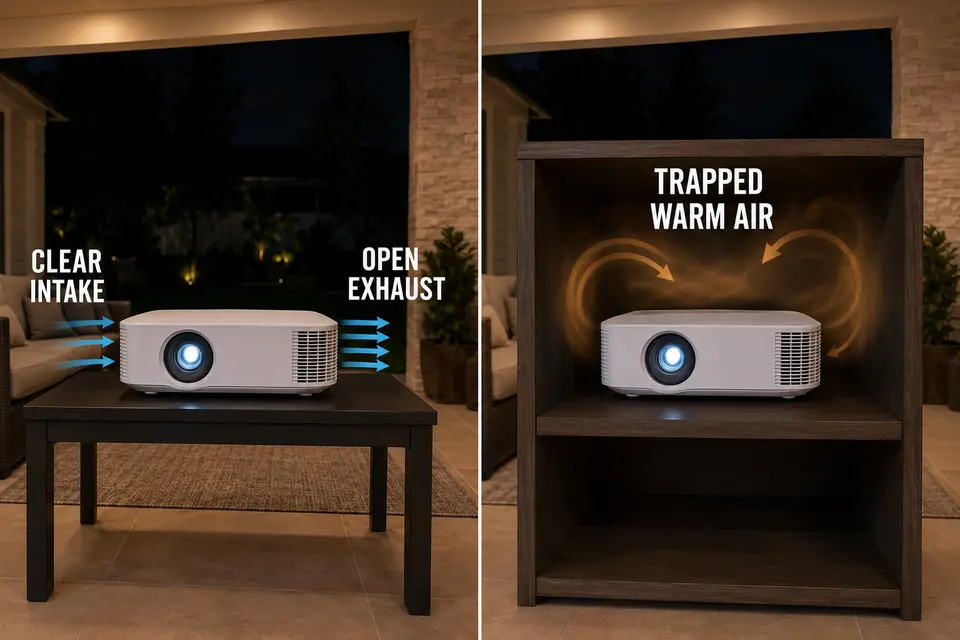
Do not operate the projector wrapped in foam, fabric, or a fitted cover. Weather protection must not obstruct ventilation during use; protection after shutdown is a separate decision covered in guidance on how to protect an outdoor projector from dew.
Overheating warnings, unexpected shutdowns, a burning odor, or abrupt mechanical noise are boundaries for this layout diagnosis. If those signs continue in a clear, ventilated position, stop rearranging the seating and follow the projector manufacturer’s inspection or service guidance.
Quiet Scene Test
The final test is valid only if one variable changes at a time. Use the expected audience arrangement rather than standing beside the projector, and keep the scene, audio level, and listening positions consistent.
- Allow the projector to reach normal operating conditions in a fully ventilated position, then select a familiar dialogue-heavy or otherwise quiet scene.
- Listen from the nearest, central, and farthest occupied seats without changing the intended movie volume.
- Identify whether the sound is smooth, steady airflow or a rattle, scrape, grind, pulse, or sudden new mechanical sound.
- Change only one variable: projector distance, position behind the seating line, speaker direction or balance, or enclosure openness.
- Replay the same scene and keep the change only if fan awareness clearly falls without compromising image alignment, dialogue comfort, ventilation, or safe movement.
Changing two variables together may produce a quieter setup without revealing why it improved. The problem then returns when the audience size or equipment position changes on another movie night.
Success is not silence measured beside the projector. It is steady fan noise that no longer pulls attention away from quiet content at occupied seats. If distance, direction, speaker coverage, and unrestricted airflow make no meaningful difference—or if the sound is mechanically abnormal—the next step is projector-specific inspection, not another yard rearrangement.
For model-specific ventilation principles, Epson’s official setup guidance explains why intake and exhaust paths must remain clear in its projector installation instructions.