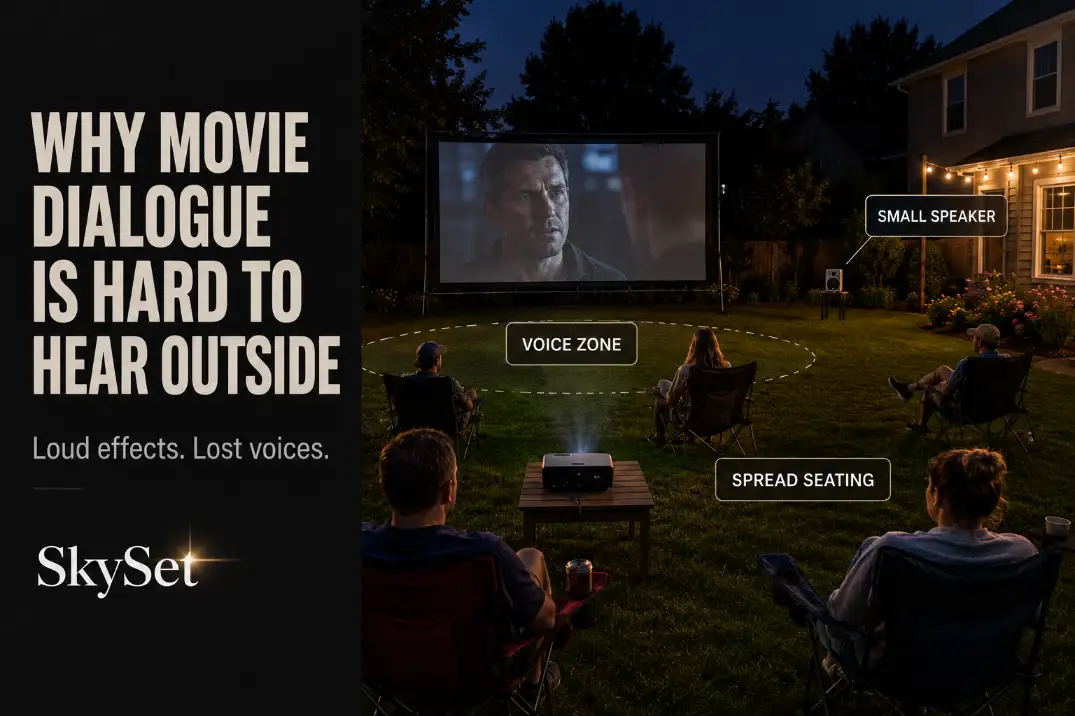
Movie dialogue is usually hard to hear outside because the voice part of the soundtrack is not staying concentrated where people sit. The first checks are simple: listen from the back row, compare a quiet conversation scene with an action scene, and notice whether speech disappears before music or effects do.
If voices sound thin from 12–20 feet away but explosions still feel loud, the problem is not basic volume. It is usually weak voice coverage, poor speaker position, bass masking, or background noise covering the midrange.
A backyard does not support sound the way a living room does. Indoors, walls and ceilings help voices stay present. Outside, sound spreads into open air, and the speaker has to do more work on its own. That is why a projector’s built-in speaker can seem fine during setup from 6 feet away, then fail once guests are sitting across 15–25 feet of lawn.
The best fix is not always a bigger speaker. First, anchor the sound closer to the screen side, reduce bass-heavy modes, narrow the seating zone, and test one dialogue-heavy scene from the actual seats.
Outdoor Space Spreads Sound Apart
The most common cause is not mysterious: outdoor space lets sound spread away from the listening area. A speaker that sounds acceptable near the projector table may not deliver clear voices to the back row or side chairs.
The useful symptom is voice loss, not low volume
Do not judge the setup by the loudest scene. Action scenes, music, and bass can make the system feel stronger than it really is. Dialogue is the better test because speech exposes weak coverage earlier.
A practical warning sign is this: if someone needs subtitles within the first 10 minutes of a normal movie, the setup is probably losing dialogue clarity. That does not mean the movie mix is always bad. It means the yard, speaker position, and seating distance are working against the voice range.
Test from the seats, not the equipment table
Many backyard movie setups are tested from the wrong place. Standing beside the projector table tells you how the speaker sounds near the gear, not how it sounds where people will actually watch.
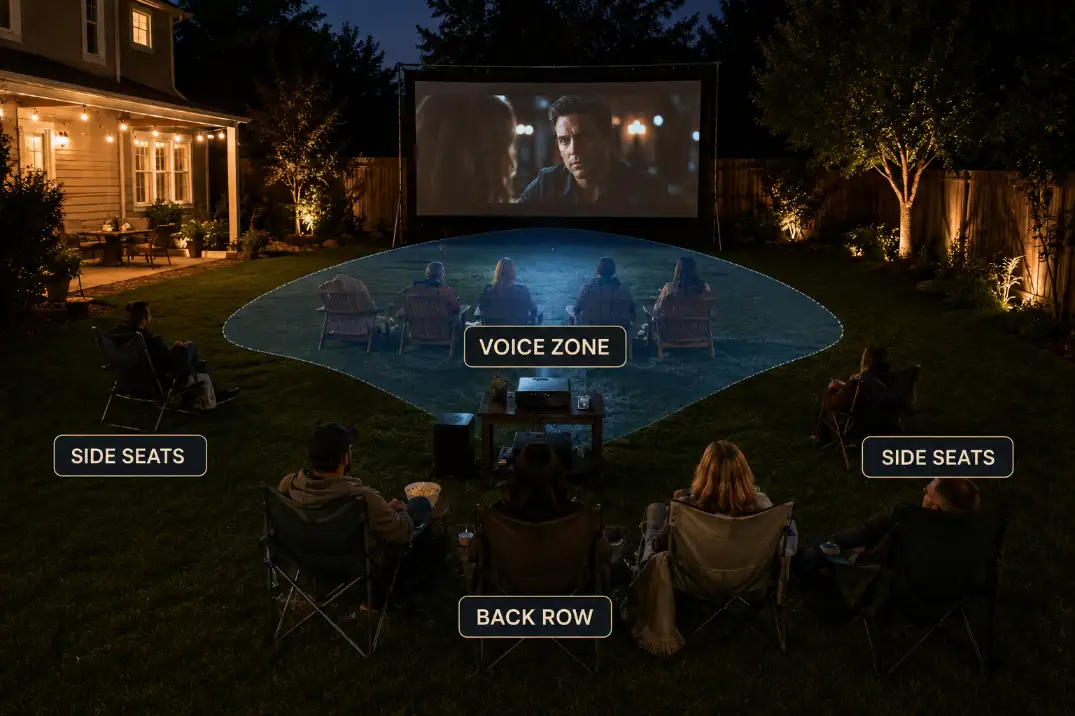
For a compact speaker, a main listening distance of roughly 8–15 feet is much easier to serve than a 20-foot back row. Once chairs spread deeper or wider than that, one small speaker often becomes a near-field speaker pretending to cover a backyard.
If the screen, projector, seating, and cables are already being placed under space pressure, a broader layout pass like Backyard Theater Planning Checklist can prevent the sound problem before it turns into a gear problem.
Built-In Projector Speakers Lose Dialogue
Built-in projector speakers are useful for setup checks, menus, and quick tests. They are rarely the right main sound source for a backyard movie night.
Speaker wattage is easy to overread
A projector may list a 5W, 10W, or 15W speaker, but that number does not tell you whether dialogue will stay clear across open seating. A small driver can make sound. It cannot automatically create a stable voice image across a lawn.
This is one of the projector specs backyard buyers often misread. A brighter image, a convenient smart interface, and a listed speaker wattage can make the projector feel complete on paper, but the audio still may not support outdoor dialogue.
That buying boundary fits naturally with Projector Specs Backyard Buyers, because speaker claims should be treated as convenience specs, not full backyard sound coverage.
The voice comes from the wrong place
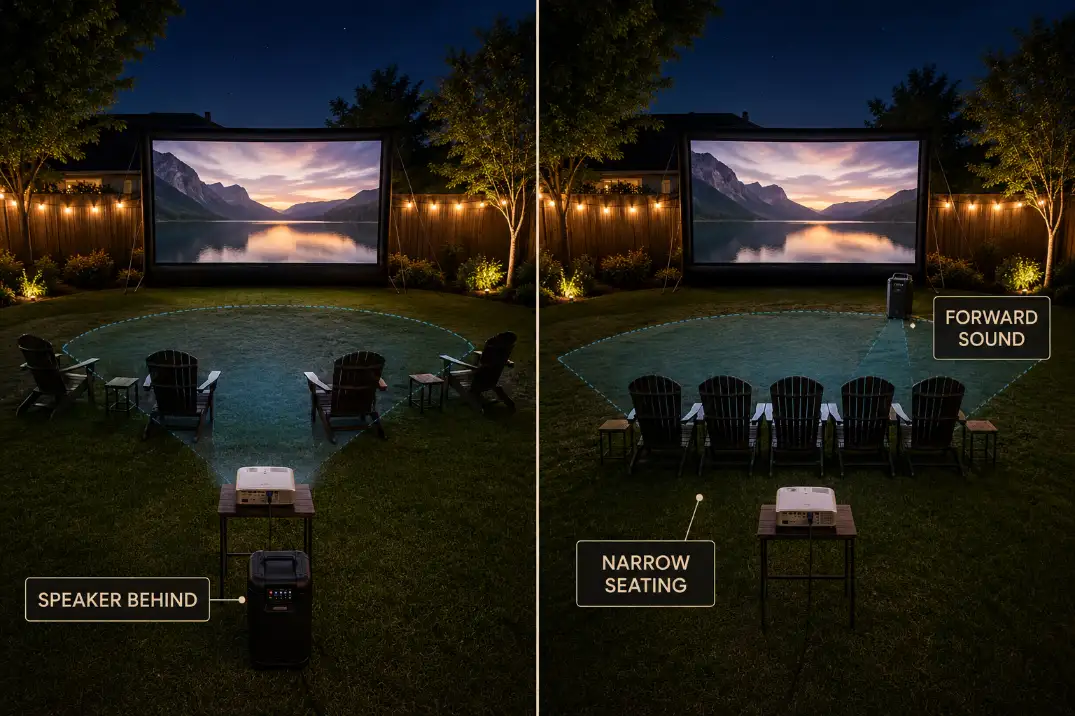
The second problem is position. A projector speaker often sits behind the audience or off to one side. The picture is in front of everyone, but the voice comes from the equipment table. That separation makes speech feel weaker and less attached to the screen.
Turning the built-in speaker to maximum rarely fixes this. It can make menu sounds sharper and effects louder, but pushed small speakers often become harsher before they become clearer.
A better first move is to use an external speaker placed closer to the screen side or centered toward the main seating area. Even before buying a large system, moving the voice source forward can make dialogue feel more natural.
Setup Note: Test with a quiet dialogue scene, not a trailer. Trailers are mixed to feel exciting and can hide weak speech clarity.
Background Noise Masks Voices Before It Feels Loud
Background noise does not have to be dramatic to hurt movie dialogue. A light breeze, nearby road, HVAC unit, pool pump, barking dog, or neighbor conversation can cover speech before the yard feels obviously noisy.
Wind is usually a stress test, not the whole cause
Wind can make outdoor sound less stable, but it is rarely the only reason dialogue disappears. More often, wind exposes a setup that was already marginal: the speaker is too far back, the seating is too wide, or the bass is too strong compared with the voice range.
The more useful rule is the 3-foot conversation test. If you have to raise your voice to talk to someone about 3 feet away, the background noise is already strong enough to compete with movie dialogue. Raising the movie volume may help briefly, but it does not solve uneven coverage.
Seating width makes noise harder to beat
A compact seating group can share the same voice path. A wide seating spread cannot. If people are scattered 20–25 feet across the lawn, the side seats hear a different balance than the center seats.
This is where speaker placement matters more than raw loudness. A speaker aimed straight down the center may serve the best chair while leaving the edges soft.
If the yard has steady noise, Outdoor Speaker Placement for Backyard Theater becomes a fix path, not just an equipment topic.
| Signal during the movie | More likely mechanism | Better first move |
|---|---|---|
| Clear near the speaker, weak in the back row | Sound is not covering seating depth | Move sound closer to listeners or add front-positioned speakers |
| Effects are loud but voices stay soft | Bass or effects are masking midrange speech | Turn off bass boost and test dialogue mode |
| Center seats hear fine, side seats miss lines | Seating width exceeds speaker coverage | Narrow the seating block or angle speakers inward |
| Voices seem to come from behind people | Projector speaker is behind the audience | Move the voice source toward the screen side |
| Sound gets worse once guests arrive | People and yard noise raise the noise floor | Test during real movie conditions, not midday |
Bass Can Hide the Center Sound
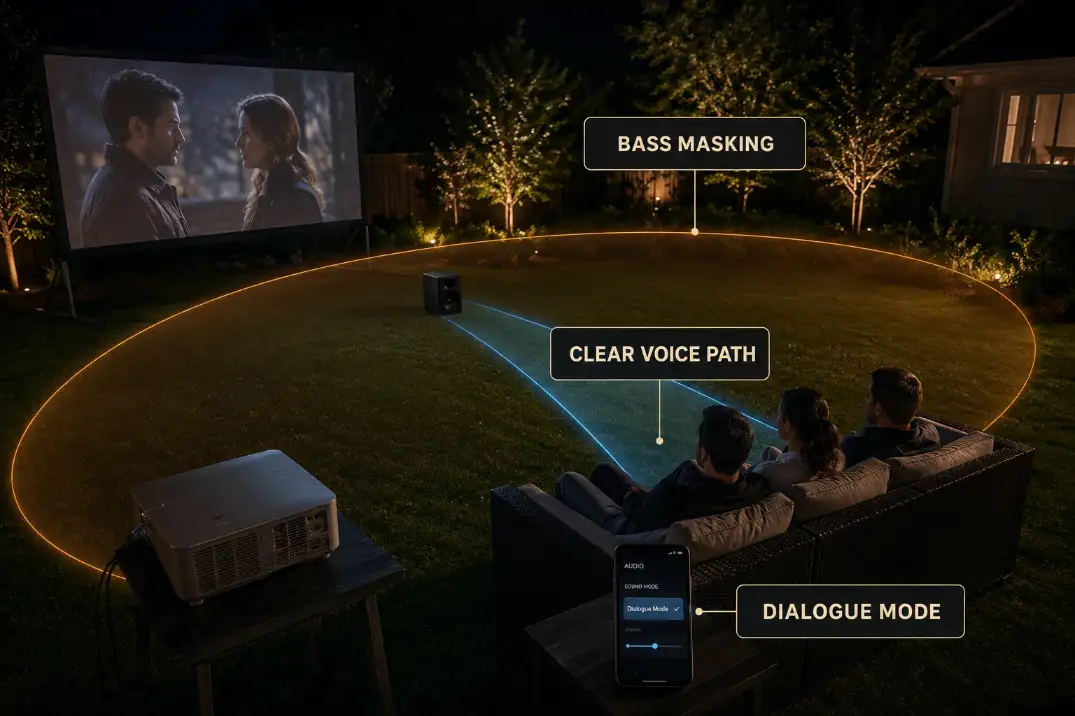
Bass feels impressive outside because it makes the setup seem bigger. But for dialogue, bass is often the first thing to reduce, not the thing to add.
Bass is not the cause every time
Bass does not usually erase dialogue by itself. It makes an already weak voice setup worse. If the speaker is behind the audience, too far from the seats, or aimed across a wide lawn, bass fills the space while the words remain soft.
That is the difference between the symptom and the mechanism. The symptom is “I cannot hear what they said.” The mechanism may be that the system is producing too much low-frequency weight compared with the center voice range.
In a simple backyard setup, center sound does not have to mean a full center-channel speaker. It means voices should feel anchored near the screen instead of floating from the projector table or drifting from one side of the yard.
Turn off sound modes before buying gear
Movie mode, bass boost, party mode, and virtual surround can all make outdoor sound feel larger while making dialogue less direct. Before changing equipment, replay the same 60–90 seconds of a conversation scene with those modes turned off.
Use standard, voice, clear, speech, or dialogue mode if the speaker or projector offers it. If the source device has an audio output setting, stereo or PCM can sometimes behave more predictably with simple speakers than a surround track being squeezed into a small outdoor setup.
A healthy result is when voices become easier to follow without making the whole movie feel aggressive. A failing result is when you raise the volume 3–5 steps, effects get louder, but spoken lines still do not land.
This is where a general weak-sound problem becomes a dialogue-specific problem. Backyard Movie Sound Weak Outdoors covers the broader failure pattern, but dialogue deserves its own test because voices usually fail before the entire soundtrack feels unusable.
Seating Spread Makes Voices Uneven
Backyard dialogue usually fails at the edges first. The center chair hears enough. The far-left chair misses quiet lines. The back row asks for subtitles. That unevenness is a layout problem as much as an audio problem.
A pretty semicircle can be bad for sound
A wide semicircle looks social, but it often weakens dialogue. The speaker has to cover both depth and width, and smaller speakers do not throw clear speech evenly across a broad arc.
For dialogue-heavy movies, a 10–12 foot wide main seating block is easier to serve than a 20–25 foot spread. Overflow chairs can sit outside that main zone, but they should not define the sound plan.
The screen centerline is not enough
Most people center the screen and projector, then let seating fill the remaining lawn. For dialogue, the speaker centerline matters too. If the sound source sits far left, far right, or behind the audience, voices become uneven even when the picture looks perfectly aligned.
The better rule is simple: screen, first row, and main speaker should feel like one working zone. Once those three points line up, the system has a fair chance. If they do not, volume becomes a patch on a layout problem.
Dialogue Fixes That Actually Help
The strongest fix order is: check sound modes, move the speaker forward, narrow the seating, reduce bass, then decide whether you need more speaker coverage. Buying more audio gear before correcting placement often wastes money.
Use a 5-minute dialogue test
Do not test with random clips. Use three short scenes from the same movie or streaming source:
- 60 seconds of quiet dialogue
- 60 seconds of action or loud effects
- 60 seconds of music under speech
Sit in the center seat, then a side seat, then the back row. If the back row needs more volume than the front row can tolerate, the problem is coverage. If effects get too loud before voices become clear, the problem is balance. If the side seat loses lines while the center seat is fine, the problem is seating width or speaker aim.
Move sound forward before making it louder
For most backyard setups, the first serious fix is an external speaker near the screen side, aimed toward the main seating area. A soundbar can work for some small setups if it is protected, stable, and close enough to the screen that voices feel attached to the picture.
A portable speaker can also work if it is centered and aimed toward the seats instead of left behind on the projector table.
This is the fix many people skip because the projector table is convenient. But convenience is not the same as clarity. If the voice source stays behind the audience, a louder speaker may still feel wrong.
Cable routing matters once the speaker moves forward. A better sound position should not create a trip line across the lawn or seating route.
If the speaker needs power or a wired connection, tie that change into Weatherproof Cable Management for Outdoor AV before the setup becomes harder to use.
Know when one speaker stops making sense
A single compact speaker stops making sense when the back row is beyond roughly 20 feet, the seating area is very wide, or the yard has steady competing noise.
At that point, the better answer may be a pair of speakers, a small outdoor PA-style setup, or a more intentional front sound position.
Bluetooth delay can also become a dialogue problem.
If voices and lips feel separated even slightly, speech becomes harder to follow because the picture and sound no longer reinforce each other. Wired audio, a direct speaker connection, or a low-latency transmitter can be more reliable than a casual Bluetooth chain.
Quick diagnostic checklist
- If voices are weak but effects are loud, turn off bass boost before raising master volume.
- If sound is clear near the table but weak in the seats, the speaker is in the wrong place.
- If side chairs miss lines, narrow the seating or angle speakers inward.
- If subtitles become necessary within 10 minutes, test a new speaker position.
- If guests raise their voices from 3 feet away, background noise is part of the problem.
- If front seats complain before back seats can hear, one speaker is not covering the depth.
Questions People Usually Ask
Will a soundbar fix outdoor movie dialogue?
A soundbar can help if it sits near the screen side and faces the seating area. It will not help much if it stays behind the audience or far off to one side. For dialogue, placement usually matters before size.
Are subtitles a sign the sound system is bad?
Not always. Some movies have difficult mixes, and some streaming tracks are more effects-heavy than others. But if subtitles become necessary for every movie outside, especially during the first few scenes, the setup is probably losing speech clarity.
Should the speaker be near the projector or the screen?
For dialogue, the speaker usually belongs closer to the screen side or at least in front of the listeners. Keeping sound near the projector is convenient, but it often makes voices feel detached from the picture and weaker across the seating area.
Is wind the main reason dialogue disappears?
Usually, no. Wind can expose a weak setup, but speaker position, seating spread, bass balance, and background noise are more consistent causes.
For broader official guidance on noise levels and speech interference, see the U.S. Environmental Protection Agency noise archive.